
In today’s fast-paced digital landscape, website speed is no longer a luxury but a fundamental requirement for success. Users expect instant gratification, and slow-loading pages lead to frustration, high bounce rates, and lost conversions. For WordPress users leveraging page builders, achieving optimal performance can sometimes feel like an uphill battle.
Elementor, a leading page builder, has continuously evolved to address these challenges. One of its most impactful innovations for enhancing website speed and development efficiency lies in its introduction and mastery of components. By understanding and implementing this powerful feature, you can transform your WordPress website development workflow, delivering lightning-fast user experiences.
Unlock Next-Level Speed: How Elementor Components Revolutionize WordPress Development
The Bottleneck: Traditional WordPress Page Building
Before the widespread adoption of component-based design in page builders like Elementor, constructing WordPress websites often involved a more fragmented and time-consuming process. Developers would typically assemble pages by combining individual widgets, custom code snippets, and pre-designed sections. While functional, this approach frequently resulted in redundant code and a lack of inherent modularity. Each page could become a unique, albeit complex, construction, making updates and maintenance a significant undertaking. The reliance on numerous individual elements often led to bloated codebases, impacting page load times and overall site performance. Without a systematic way to manage and reuse design elements, consistency across a site could also suffer, requiring constant manual adjustments.
Furthermore, when developers needed to implement a specific design element across multiple pages, they would often have to rebuild it from scratch or copy and paste existing configurations. This manual duplication is not only inefficient but also introduces a high risk of inconsistencies and errors. If a particular styling or functionality needed to be updated, it had to be replicated across every instance, a tedious and error-prone task that directly hampered development speed and introduced potential performance issues through repeated, unoptimized code.
Introducing Elementor Components: The Building Blocks of Speed
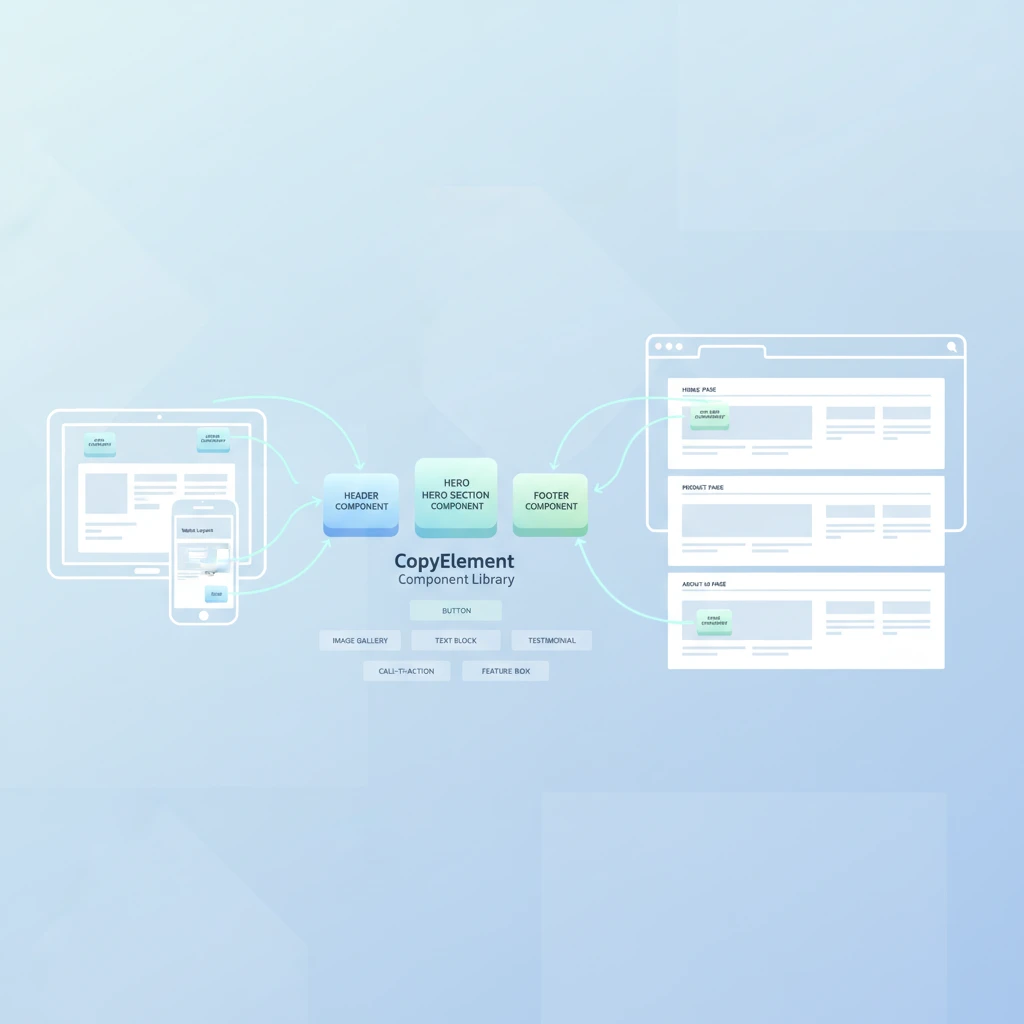
Elementor Components represent a paradigm shift in how WordPress websites are built, fundamentally changing the development workflow for the better. Instead of assembling pages from a collection of disparate widgets, you can now create and utilize self-contained, reusable building blocks. Think of them as pre-fabricated modules that encapsulate specific design elements and functionalities. These components can range from a simple button style to an entire testimonial slider section. The core benefit is encapsulation and reusability, meaning once a component is designed and optimized, it can be deployed across an entire website with a single action, ensuring consistency and significantly reducing development time.
This approach allows developers to focus on crafting high-quality, optimized individual components rather than repeatedly building the same elements. The result is a cleaner, more efficient codebase. When you use a component, you’re not just adding a visual element; you’re integrating a fully functional, pre-designed unit. This modularity inherently leads to faster development cycles and, crucially, contributes to improved website performance, as optimized components can be leveraged consistently, minimizing code duplication and bloat.
Why Speed Matters in 2026: User Experience and SEO
By 2026, website speed has solidified its position as a critical determinant of online success. Users today have extremely low patience thresholds; a delay of even a few seconds can result in a visitor abandoning your site. This direct impact on user experience (UX) translates into higher bounce rates and lower engagement metrics. When visitors have to wait for content to load, their likelihood of interacting with your site, making a purchase, or completing a desired action plummets. A fast website provides a seamless and enjoyable journey, encouraging deeper exploration and fostering a positive brand perception.
Beyond user perception, search engines like Google heavily prioritize website speed in their ranking algorithms. A faster website is perceived as a better user experience, and therefore, it tends to rank higher in search results. This means that optimizing your Elementor website with components that contribute to speed can directly lead to improved SEO performance and increased organic traffic. Investing in speed optimization is not just about pleasing users; it’s a strategic move to enhance your site’s visibility and attract more potential customers through search engines, as detailed in guides on SEO-optimized WordPress websites.
Beyond Basic Widgets: Understanding the Power of Elementor Components
What Exactly are Elementor Components?
In the context of Elementor, components are essentially reusable, self-contained design modules that can be saved and deployed across multiple pages or even different websites. They are more than just saved sections; they represent a complete unit of design and functionality. Imagine creating a custom header, a stylish pricing table, or an interactive portfolio grid. Once built and saved as a component, this entire structure, including its styling, content, and any associated widget settings, becomes a single, manageable entity. This approach elevates the standard page-building process by introducing a layer of modularity that was previously difficult to achieve efficiently without custom coding.
These components are not limited to static content. They can include dynamic elements, intricate styling, and custom configurations. When you add a component to a page, you are effectively inserting a pre-built, optimized section that can be easily customized. This makes them incredibly powerful for maintaining brand consistency and accelerating development workflows, especially for agencies or developers working on multiple client projects. The ability to create and manage these sophisticated building blocks is key to understanding their performance benefits.
Components vs. Standard Widgets: Key Differences
The distinction between Elementor components and standard widgets lies primarily in their scope and reusability. Standard widgets are the fundamental building blocks provided by Elementor (or third-party add-ons) such as headings, text editors, and image widgets. While you can customize each instance of a widget, they are generally designed for single-use within a page layout. In contrast, Elementor components are entire sections or groups of widgets that you design, save, and then reuse across your site. For example, a single “Button” widget is a standard widget, but a pre-designed “Hero Section” containing a headline, subheadline, button, and background image, saved as a component, would be a component.
The critical difference is that a component acts as a distinct, savable entity that can be updated globally. If you decide to change the styling of a button within a saved component, that change can propagate to all instances where that component is used, provided you choose to sync these updates. This offers a level of control and efficiency that simply isn’t possible with individual widgets, which would require manual modification on every page they appear. Components streamline maintenance and ensure design consistency far more effectively than repeatedly copying and pasting widget configurations.
The Role of Reusability in Component-Based Design
Reusability is the cornerstone of efficiency and speed when working with Elementor components. Instead of rebuilding the same design elements—like a testimonial card, a team member profile, or a call-to-action banner—for every page, you create it once as a component. This component can then be easily inserted into any page or post with a simple drag-and-drop action. This dramatically reduces development time and eliminates the tedious process of manual duplication. The benefit extends beyond initial creation; if a design needs to be updated, you modify the master component, and those changes can be applied across all its instances.
This principle of reusability is directly tied to performance. When you reuse a component, you are using a single, optimized block of code and styles, rather than multiple, potentially unoptimized, individual widget configurations. This leads to a cleaner HTML structure and reduced CSS/JavaScript load times. For a comprehensive understanding of how to streamline your build processes, exploring options for streamlining Elementor workflows can be highly beneficial.
Designing for Performance: Optimizing Elementor Components for Speed
Image Optimization within Components
Images are often the largest contributors to page weight, and their optimization within Elementor components is paramount for achieving high-speed websites. When designing components, it’s crucial to use appropriately sized images. Uploading overly large image files and relying on the browser to resize them is an inefficient practice that unnecessarily increases load times. Use image editing tools to resize images to the exact dimensions they will be displayed on the website before uploading them to WordPress. Furthermore, consider using modern image formats like WebP, which offer superior compression and quality compared to traditional JPEG or PNG files.
Elementor itself offers some basic image optimization features, but for a more robust solution, integrating a dedicated image optimization plugin is highly recommended. These plugins can automatically compress images upon upload, resize them, and even serve next-gen formats like WebP. When creating or using components that feature images, always double-check the file sizes and dimensions. For instance, if a component displays a hero banner that is 1920px wide on desktop, ensure the uploaded image is no larger than that and is compressed effectively. This diligence ensures that your visually rich components don’t become performance bottlenecks.
Minimizing CSS and JavaScript Bloat
Every widget, plugin, and custom script adds CSS and JavaScript to your WordPress site, and an accumulation of these can significantly slow down loading times. When using Elementor components, it’s vital to be mindful of the cumulative impact of the included scripts and styles. A single, complex component might load more assets than several simple widgets combined. Therefore, evaluate the necessity of each element within a component and strive for lean designs. Avoid loading heavy scripts for simple functionalities if lighter alternatives exist. Many page builders, including Elementor, can sometimes enqueue more CSS and JS than is strictly needed for a given page, a problem that component-based design can help mitigate if managed correctly.
To combat bloat, regularly audit your website’s asset loading. Tools like Google PageSpeed Insights or GTmetrix can identify which scripts and styles are taking the longest to load. Consider using plugins that optimize CSS and JavaScript by minifying them, deferring their loading, and removing unused code. For Elementor-specific optimizations, explore options for speeding up WordPress with optimized components, which often involve strategies to reduce the overall footprint of your website’s frontend code.
Leveraging Lazy Loading for Enhanced Performance
Lazy loading is a technique that defers the loading of non-critical assets—primarily images and iframes—until they are actually needed by the user as they scroll down the page. This dramatically improves the initial page load time because the browser only needs to render the above-the-fold content first. Elementor provides built-in support for lazy loading, and it’s an essential feature to enable, especially within components that contain numerous images or videos, such as galleries, carousels, or portfolio grids. Ensuring lazy loading is active for all applicable media within your components is a straightforward yet highly effective performance enhancement.
When creating or selecting components, confirm that any images, background videos, or iframes within them are configured to use lazy loading. Most modern Elementor themes and plugins offer this option within their settings or on a per-widget basis. By implementing lazy loading, you ensure that users see content faster, leading to a better experience and reduced bounce rates. This is particularly beneficial for pages with a lot of visual content, where the cumulative impact of loading all assets at once would be detrimental to performance.
Building Conversion-Ready Websites with Component-Driven Design
Structuring Components for User Flow
When designing Elementor components with conversion in mind, structuring them to guide the user’s journey is paramount. Each component should serve a specific purpose within the overall flow of the page, leading the visitor logically towards a desired action. For instance, a “Features” component should clearly highlight benefits, while a “Testimonials” component builds trust. The visual hierarchy and layout within the component are crucial; ensure that the most important information is prominent and that the path to the next step is intuitive. Strategic placement and clear calls-to-action within components are key to their effectiveness in driving conversions.
Consider the user’s intent at each stage. If a user is exploring services, a component showcasing different service packages should be easy to navigate and clearly differentiate offerings. If they are nearing a purchase decision, a component featuring customer reviews or a direct link to the checkout page becomes vital. By thinking about how users interact with each element and how each component contributes to the overall narrative, you can craft a more persuasive and effective user experience. This aligns with creating compelling landing pages that convert.
Integrating Call-to-Actions Seamlessly
Call-to-actions (CTAs) are the engines of conversion, and their integration within Elementor components must be both prominent and contextually relevant. A CTA button within a component should not feel like an afterthought; it should be a natural progression from the content presented. For example, a component detailing a specific product feature should logically lead to a CTA like “Learn More” or “Add to Cart.” The design of the CTA itself—its color, size, and text—should be optimized for visibility and click-through rates, while also aligning with the overall aesthetic of the component and the website. Effective CTAs are clear, concise, and action-oriented.
To maximize their impact, CTAs within components should be placed strategically. Consider using them at the end of a descriptive component, within a visual highlight, or as a recurring element in longer sections. The surrounding text and design elements should actively encourage the user to take the desired action. Elementor provides a robust “Button” widget that can be styled extensively, making it ideal for crafting prominent CTAs within your custom components. Remember that testing different CTA phrasing and designs can significantly improve conversion rates.
A/B Testing Component Variations for Better Results
Even with meticulously designed components, there’s always room for improvement, and A/B testing is the most effective way to achieve this. By creating variations of your components and showing them to different segments of your audience, you can gather data on which designs perform best in terms of conversions. For example, you might test two versions of a “Sign-Up” component: one with a prominent image and another with a more text-focused layout. Elementor’s built-in A/B testing features, or integrations with dedicated testing tools, allow you to systematically experiment with different headlines, button text, layouts, and imagery within your components.
The data gathered from A/B tests provides invaluable insights into user behavior and preferences. This allows you to make data-driven decisions about which design elements are most effective at driving conversions. For instance, you might discover that a specific color for your CTA button leads to a 15% higher click-through rate, or that a particular arrangement of elements in a pricing component results in more users opting for a premium plan. Continuously testing and iterating on your components ensures that your website remains optimized for performance and maximizes its conversion potential over time, contributing to the overall goal of building high-performing websites.
Streamlining Your Workflow: The Efficiency Gains of Using Components
In the dynamic world of web development, efficiency is paramount. Elementor components, when utilized effectively, serve as powerful building blocks that can dramatically accelerate your workflow. Instead of crafting individual elements from scratch for every project, reusable components allow for a significantly faster design and development process. This shift from linear building to modular assembly is a core principle for maximizing productivity. Imagine needing a specific testimonial card; with a component, you simply drag and drop it, making instant adjustments rather than rebuilding the entire structure. This saves considerable time and effort, allowing you to focus on more complex design challenges or client needs. This approach is crucial for agencies handling multiple projects or freelancers aiming to increase their output without sacrificing quality.
Rapid Prototyping with Pre-built Components
The ability to quickly bring ideas to life is a cornerstone of effective prototyping. Elementor components, especially those pre-designed and optimized, empower you to rapidly assemble functional wireframes and mockups. This means you can present visual concepts to clients much faster, gather feedback earlier, and iterate on designs with unprecedented speed. Instead of spending hours on basic layouts, you can leverage pre-built sections for headers, footers, content blocks, and call-to-action areas. For example, a client might want to see several different homepage layouts. Using a library of components, you could generate three distinct variations in the time it might have taken to build just one from scratch. This acceleration not only speeds up the initial design phase but also allows for more exploratory design work, leading to potentially better final outcomes. This rapid iteration is a key differentiator for staying competitive in the web design industry.
Maintaining Brand Consistency Across Pages
Brand consistency is vital for establishing credibility and recognition. Elementor components act as standardized design elements that ensure uniformity across all your web pages. When you create or utilize a component for a specific purpose, such as a call-to-action button or a client logo showcase, it contains predefined styling, typography, and spacing. By reusing these components, you guarantee that your brand’s visual identity remains cohesive, whether a user is on the homepage, an about page, or a blog post. This eliminates the common pitfall of minor inconsistencies that can erode a brand’s professional image. For instance, if your brand uses a specific button style, creating a component for it ensures that every button across the site adheres to this standard, reinforcing a strong and consistent user experience. This is invaluable for maintaining a professional online presence, especially for businesses with established brand guidelines.
Collaborative Design with Shared Component Libraries
Effective collaboration is essential for larger teams or agencies. Elementor components facilitate teamwork by providing a centralized and shared repository of design assets. When all team members access and use the same set of components, they are working with a unified design system. This prevents the common problem of different designers creating slightly different versions of the same element, which can lead to inconsistencies and increased rework. For example, a design team can agree on a standard pricing table component. All designers and developers can then pull this exact component, ensuring that pricing tables across all client projects look and function identically. This streamlined approach not only improves collaboration but also significantly reduces the margin for error, leading to more efficient project delivery and a higher quality final product. Explore how to integrate these principles into your team’s workflow to foster better cooperation and consistency.

Creating Your Own High-Performance Elementor Components
While pre-built component libraries offer immense value, there are times when creating custom components is necessary to meet unique project requirements or to optimize for specific performance needs. Developing your own Elementor components allows for precise control over functionality, design, and code. This approach is particularly beneficial when you need highly specialized features or wish to ensure that components are as lightweight and efficient as possible, contributing directly to faster website loading times. It moves beyond simply assembling existing parts to actively engineering reusable assets that enhance the overall quality and performance of your WordPress websites. This empowers you to tailor every aspect, from the underlying code structure to the visual presentation, ensuring they align perfectly with your design vision and technical standards.
Best Practices for Component Structure
When building custom Elementor components, adopting a structured approach is key to ensuring they are maintainable, scalable, and performant. A fundamental principle is to design components with a single, focused purpose. Avoid creating monolithic components that try to do too many things, as this leads to complexity and potential conflicts. Instead, break down functionalities into smaller, modular parts. For instance, a “Card” component might be structured to handle image display, text content, and a call-to-action button, but it shouldn’t also be responsible for complex animations or external data fetching. This modularity makes components easier to update, debug, and reuse across different parts of a website or even in future projects. Consider how each component interacts with others and ensure clear data flow, which is crucial for predictable behavior and easier troubleshooting.
When to Create vs. When to Use Existing Components
Deciding whether to build a new component or utilize an existing one is a critical efficiency decision. Generally, if a suitable component already exists, use it. This leverages the work already done, saving you time and resources. Existing components from reputable libraries like CopyElement are often well-tested, optimized for performance, and designed with common use cases in mind. However, you should consider creating a custom component when: your project demands highly specific functionality not available elsewhere; you need to adhere to strict branding guidelines that existing components cannot meet; or you aim to achieve a level of performance optimization that pre-built components might not offer. For example, if you need a unique interactive slider with custom animations and specific data integration, it’s likely more efficient to build it yourself than to heavily modify an existing, general-purpose slider. Always weigh the time investment of creation against the benefits of customization and optimization.
Tools and Techniques for Component Development
Developing custom Elementor components involves leveraging specific tools and adhering to best practices to ensure efficiency and quality. A foundational technique is to utilize Elementor’s own features for creating reusable sections and global widgets, which serve as the basis for many custom components. For more advanced needs, developers can explore custom Elementor widgets, often built using PHP and JavaScript. These allow for deep customization of appearance and behavior. When structuring your code, consider using a modular approach, similar to how frameworks like React or Vue.js handle components, even if you’re not using those specific frameworks directly. This means encapsulating styles and scripts within the component itself to avoid conflicts and ensure portability. For complex interactions, judicious use of JavaScript can add dynamic functionality, but always be mindful of its impact on page load speed. Understanding the underlying structure of Elementor and WordPress can greatly enhance your ability to create robust and high-performing components.
Leveraging CopyElement’s Library for Instant Speed Improvements
For web designers and developers aiming to build faster WordPress websites, CopyElement’s extensive library of pre-built components presents a significant advantage. These aren’t just aesthetically pleasing; they are engineered with performance optimization as a core consideration. By integrating these components, you bypass the common pitfalls of custom coding that can inadvertently introduce performance bottlenecks. Instead, you are using elements that have been vetted for efficiency, ensuring that your pages load quickly and provide a smooth user experience. This strategic use of optimized assets allows for a much faster development cycle without compromising on the speed and responsiveness of the final website. It’s an intelligent way to accelerate your building process while simultaneously enhancing site performance, a crucial factor for SEO and user engagement in today’s digital landscape.
Discovering Performance-Optimized UI Blocks
The key to leveraging CopyElement for speed lies in understanding its collection of performance-optimized UI blocks. These blocks are not generic; they are crafted with efficiency in mind, meaning they use minimal code, optimized images, and efficient scripts. When you select a UI block from the CopyElement library, you are choosing an element that has been pre-designed to load quickly and function smoothly. For example, instead of building a gallery from scratch, you can use a CopyElement gallery block that is already optimized for fast image loading and responsive display. This conscious choice to use pre-optimized assets directly contributes to a faster website. Explore the library to find blocks for various sections—hero banners, feature lists, pricing tables, and more—all designed to enhance user experience through speed and responsiveness.
Applying Conversion-Focused Templates in Minutes
Beyond individual components, CopyElement offers professionally designed, conversion-focused templates that can be implemented in minutes. These templates are more than just collections of elements; they are strategically designed layouts, often for landing pages or specific website sections, that are proven to engage visitors and encourage desired actions. By integrating these pre-built templates, you not only save substantial development time but also benefit from designs that have been created with conversion rates in mind. For instance, you can deploy a high-converting landing page template for a marketing campaign within a fraction of the time it would take to design and build it from scratch. This accelerated workflow allows you to launch campaigns and updates more rapidly, facilitating quicker A/B testing and optimization cycles to maximize your website’s effectiveness.
Integrating Pre-built Components into Your Projects
Integrating CopyElement’s components into your WordPress projects using Elementor is a straightforward process designed for efficiency. Once you have accessed the CopyElement library, you can typically import components directly into your Elementor editor. The process usually involves selecting the desired component and then using Elementor’s import functionality, or CopyElement’s specific integration tools if available, to add it to your page. This seamless integration means you can quickly populate your website with professional-looking, high-performance sections. For example, if you’re building a service page, you can import a pre-designed service block, customize the text and images, and have a complete section ready in moments. This workflow drastically reduces the manual effort involved in web design and allows you to focus on higher-level strategy and content. The ability to quickly integrate templates and sections is a hallmark of efficient Elementor usage.
Troubleshooting Common Speed Issues with Elementor Components
Even with the use of optimized components, websites can sometimes encounter speed issues. Understanding how to troubleshoot these problems is crucial for maintaining a high-performance site. Common culprits include conflicts between components, poorly optimized images within components, or excessive use of certain dynamic features. Elementor, while powerful, requires careful management to ensure optimal loading times, especially when incorporating numerous components and third-party plugins. By systematically identifying and addressing these bottlenecks, you can ensure your Elementor-powered website remains fast and responsive for all users. This proactive approach to problem-solving is essential for delivering a consistently positive user experience and supporting your website’s SEO goals.
Identifying Performance Bottlenecks in Your Design
To effectively troubleshoot speed issues, you first need to pinpoint the specific bottlenecks within your Elementor design. Tools like Google PageSpeed Insights, GTmetrix, or even your browser’s developer tools can provide valuable data. Look for elements that have unusually long load times, excessive HTTP requests, or large file sizes. Often, a single component might be the offender, perhaps due to unoptimized images, heavy JavaScript, or complex CSS. For instance, a visually rich component with many high-resolution images might significantly slow down page load. Another common issue is the accumulation of small, unoptimized assets from multiple components. Systematically disabling components or sections can help isolate the problematic area. By understanding these performance metrics, you can make informed decisions about which components to optimize or replace.
Resolving Conflicts Between Components and Plugins
Conflicts between Elementor components and other plugins are a frequent cause of website slowdowns or errors. When multiple plugins or components attempt to load the same resources or modify the same HTML elements, it can lead to unexpected behavior and performance degradation. To resolve these, employ a process of elimination. Deactivate plugins one by one (while temporarily switching to a default theme like Twenty Twenty-One to rule out theme conflicts) and test your website’s speed after each deactivation. If deactivating a specific plugin resolves the speed issue, you’ve likely found the culprit. Similarly, if disabling a particular component or group of components improves performance, investigate that specific element further. Sometimes, updating plugins or Elementor itself can resolve known conflicts. Always ensure your WordPress core, themes, and all plugins, including Elementor add-ons, are kept up-to-date.
Cache Management Strategies for Component-Heavy Sites
Effective cache management is absolutely essential for websites that rely heavily on Elementor components to maintain speed. Caching stores static versions of your web pages, reducing server load and speeding up delivery to visitors. For sites with numerous components, consider a multi-layered caching approach. This includes server-level caching (often provided by your hosting provider), WordPress caching plugins (like WP Rocket, W3 Total Cache, or LiteSpeed Cache), and browser caching. When implementing components, ensure your caching plugin is configured to properly clear its cache whenever you make updates to pages or components. For advanced users, specific optimization techniques like object caching or CDN integration can further enhance performance. Proper cache management ensures that visitors consistently receive the fastest possible version of your pages, even with complex component structures. For more in-depth strategies, understanding how to optimize website speed with component caching is vital.
Future-Proofing Your WordPress Site with Component-Based Architecture
Adopting a component-based architecture is no longer a niche strategy; it’s becoming the bedrock of modern web development, particularly within platforms like Elementor. This approach breaks down a website into reusable, independent modules, or components, each responsible for a specific function or design element. Think of it like building with LEGO bricks: each brick is a component, and you can combine them in countless ways to create a unique structure. In the context of Elementor, these components can range from a single button style to an entire hero section, a testimonial slider, or a complex pricing table. This modularity offers significant advantages for long-term website health, allowing for easier updates, enhanced flexibility, and a more streamlined development process. By focusing on distinct, manageable pieces, you reduce the complexity of your website as a whole, making it more resilient to future changes and technological advancements. This fundamentally shifts how we think about building and maintaining WordPress sites, moving from monolithic page structures to interconnected, adaptable systems.
The core benefit lies in the ability to standardize design elements and functionalities across your entire website. Instead of recreating the same button style or form layout repeatedly, you create it once as a component and then reuse it everywhere. This not only saves immense development time but also ensures visual consistency, a crucial aspect of professional web design and user experience. When every element follows a predefined pattern, users can navigate and interact with your site more intuitively. Furthermore, component-based development inherently promotes a more organized and logical site structure, making it easier for both human developers and search engine crawlers to understand the content and layout. This structured approach is vital for long-term success, enabling your website to adapt and grow without becoming a tangled mess of code and design.
Adapting to Evolving Web Standards
The digital landscape is in constant flux, with new technologies, design trends, and user expectations emerging regularly. A component-based architecture is inherently suited to navigating these changes. When a web standard evolves, such as the push for enhanced accessibility or new semantic HTML practices, you don’t need to overhaul your entire website. Instead, you can update the specific components affected by the change. For example, if new Web Content Accessibility Guidelines (WCAG) are released, you can systematically review and modify your accessible form components, navigation elements, or image carousels without disrupting unrelated sections of your site. This targeted approach minimizes the risk of introducing errors and significantly reduces the time and effort required for compliance updates.
This adaptability extends to how your site interacts with new browser features and performance optimizations. As browsers introduce new APIs or update rendering engines, component-based systems allow for quicker integration of these improvements. For instance, if a new CSS feature emerges that can significantly enhance the responsiveness of a particular element, like a complex grid layout, you can update that specific component. This makes your website more future-proof, ensuring it remains performant and compatible with the latest web technologies. This agility is paramount in today’s fast-paced digital environment, where falling behind on standards can impact user experience, SEO, and overall site effectiveness. The ability to iteratively update discrete parts of your website is a powerful advantage.
Scalability and Maintainability of Component Designs
One of the most compelling reasons to adopt a component-based approach is its direct impact on scalability and maintainability. As your website grows, adding new pages or features, a component system ensures that this growth is manageable. Instead of building every new section from scratch, you leverage existing, well-tested components, often drawing from a library like CopyElement. This not only accelerates development but also guarantees that new additions adhere to the established design language and functional standards of your site. Imagine needing to add a new service offering to your website; if you have a pre-built service box component, you can deploy it across multiple pages consistently and quickly. This reduces the likelihood of design drift and technical debt accumulating over time.
Maintenance becomes significantly less daunting with a component-based structure. When a bug is discovered or a small update is needed, you can pinpoint the exact component responsible and make the necessary changes in one place. For instance, if a specific button style needs a color update across your entire site, you modify the master button component, and the change propagates everywhere it’s used. This contrasts sharply with traditional methods where you might have to manually edit dozens or even hundreds of individual instances, a process prone to errors and omissions. This efficiency is crucial for businesses that need to keep their online presence fresh and functional without incurring exorbitant maintenance costs. It also makes onboarding new team members easier, as they can quickly understand the site’s building blocks.
The Long-Term Impact on Website Performance and UX
The strategic use of components profoundly influences website performance and user experience (UX). By creating optimized, reusable modules, developers can ensure that each component is built with efficiency in mind. For example, a well-designed image gallery component might employ lazy loading and appropriate image sizing, contributing to faster page load times. When these optimized components are reused across the site, the cumulative effect on performance is substantial. Websites built with a component-based methodology tend to be lighter and faster, as they avoid redundant code and assets. This directly translates to a better user experience, reducing bounce rates and increasing engagement. As highlighted in guides on building high-speed WordPress websites, performance is a critical factor for user satisfaction and search engine rankings.
Beyond raw speed, components contribute to a more coherent and intuitive user journey. Consistent UI elements, navigation patterns, and interaction behaviors build familiarity and trust for visitors. When users encounter the same type of element—like a modal pop-up or a card layout—and it functions predictably, their cognitive load is reduced, allowing them to focus on the content. This predictability enhances usability and can lead to higher conversion rates, especially for targeted pages like landing pages, which can be assembled using conversion-focused Elementor templates. A component-based approach ensures that these crucial elements are not only visually appealing but also functionally robust and user-friendly, creating a seamless and positive experience from the first click to the final conversion.